
Sometimes when DropPost tries to publish, the platform's own API times out, rate-limits the request, or briefly errors out. That's ordinary internet weather on the platform's side, not a problem with your photo, your caption, or your account.
Help / What "Retrying" means
What "Retrying" means
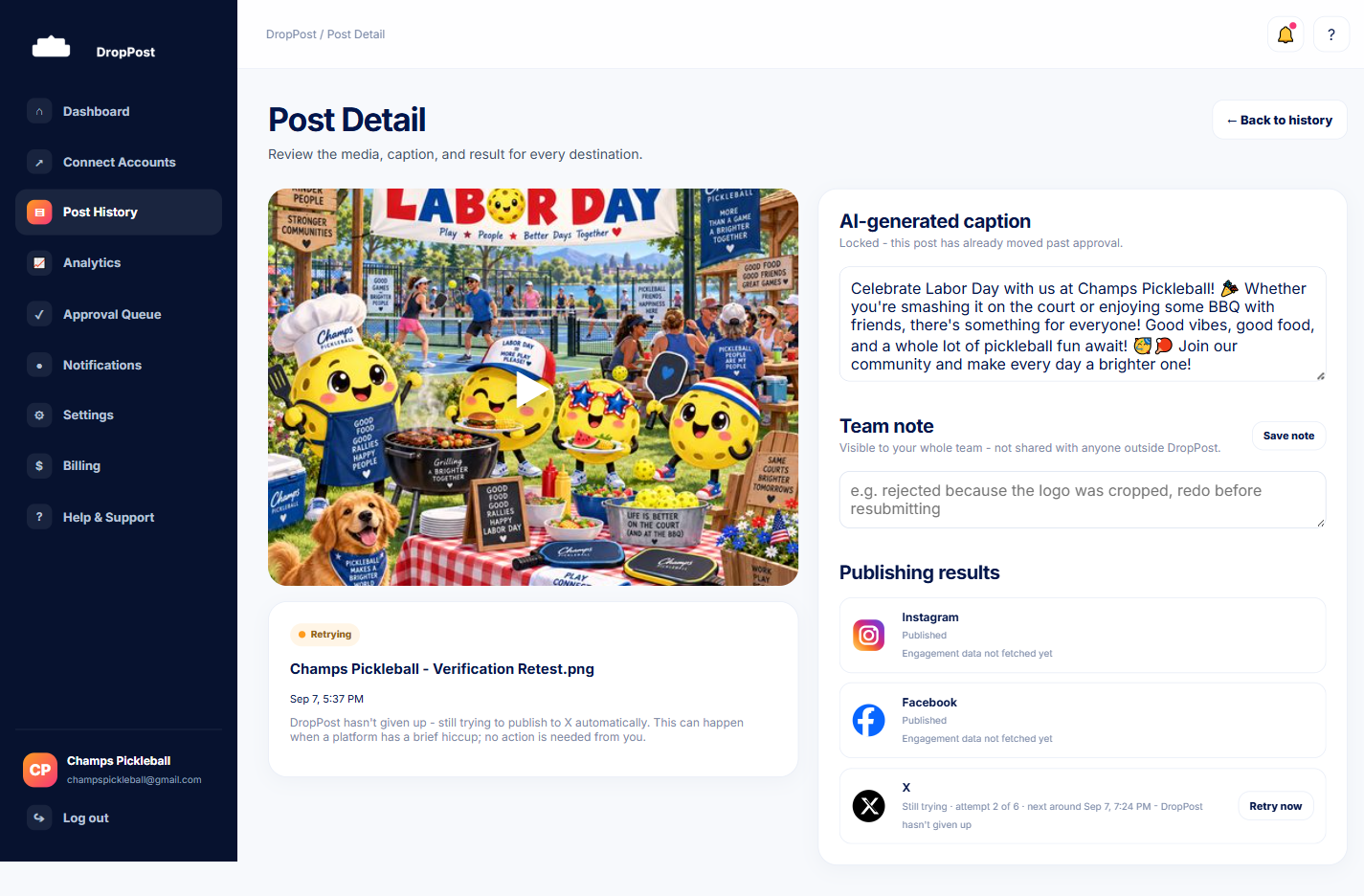
Every so often, a post that reaches Post History or Post Detail shows a status of Retrying instead of Published or Error. This isn't a sign that something is broken with your account — it's DropPost actively working through a temporary problem on the platform's end, without any input from you. Here's exactly what it means and what, if anything, you need to do about it.
What you'll need
Nothing to set up — this is background behavior DropPost handles on its own. Just know what you're looking at when you see it.
Steps
1
A platform hiccup happens
2
DropPost retries immediately
Right after a failed attempt, DropPost retries a handful of times in quick succession, waiting a little longer between each try.
3
Then it keeps retrying in the background for hours
If those immediate retries don't succeed, DropPost doesn't give up — it keeps trying automatically in the background for several hours, checking back in on its own.
4
It's shown as Retrying, not Error
DropPost keeps these two statuses separate on purpose. Error means DropPost has stopped trying and something needs your attention; Retrying means it's still actively working the problem for you.
5
No action is required from you
You can leave a Retrying post alone entirely. There's nothing to click, resend, or fix — DropPost is handling it in the background for as long as the retry window runs.
6
Use Retry now if you don't want to wait
If you'd rather not wait for the next automatic attempt, the Retry now button on Post Detail triggers a retry immediately.
7
DropPost always checks first, so nothing posts twice
Before any retry — automatic or triggered by you clicking Retry now — DropPost double-checks the platform's own API to confirm the earlier attempt didn't actually succeed after all. That means the same photo or video can never end up posted twice, no matter how many times a retry runs.
If a platform eventually exhausts all of its automatic retries, the status changes to Error. That's the point where checking the guide on why a post failed is the right next step.
What happens next
Once a retry succeeds, that platform's status updates to Published and a real link appears on Post Detail, just like any other successful post.